PixSmart Digital Imager1.0
Publisher Description
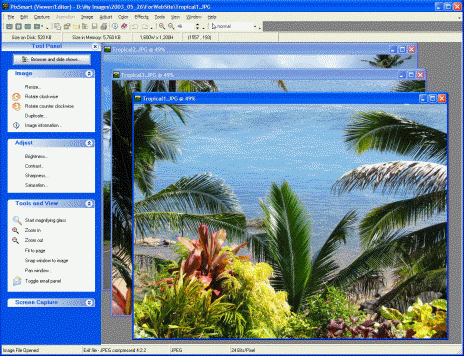
PixSmart makes working with your digital images easy and fun. All popular formats and many other graphic formats supported, including JPEG, TIF, GIF (including animated), BMP, PNG, PSD, WMF, EMF, TGA, PCX, MAC, WPG, and more.
Many ways to edit, enhance and manipulate your images. Full-featured screen capture gives you tremendous capturing flexibility. Magnifying glass, pan window and other viewing options. Portable slide shows. Email images. IPTC compliant. Convert between formats. Powerful image browser allows for resizing and rotate batches of images simultaneously.
Crop, Resize, Rotate, Shear, Trim, Despeckle, Duplicate, Adjust brightness and contrast, Sharpen, Equalize, Gamma correct, Adjust saturation and hue, Remove red-eye, Set color resolution, Balance colors, Invert colors, Swap colors, Perform color separations and merges, Convert images to grayscale, Create halftones, Posterize, Solarize, Create mosaic effects, Emboss, Add and remove blurs of different types, Add and remove noise, Apply underlay patterns, Blend and combine images, Create oil painting effects, Add text and Draw effects.
Create slide shows using thousands of transition effects. Save slide shows for future use. Package shows in single file stand-alone applications that can be emailed easily from PixSmart. Add titles/captions to each slide. Precision control of show while it is playing.
Drag and drop images from PixSmart and to PixSmart from other Windows applications.
About PixSmart Digital Imager
This Editors program is available in English. It was last updated on 29 September, 2026. PixSmart Digital Imager is compatible with the following operating systems: Windows.
The company that develops PixSmart Digital Imager is Tikina Software. The latest version released by its developer is 1.0. This version was rated by 5 users of our site and has an average rating of 4.4.
The download we have available for PixSmart Digital Imager has a file size of 8.4 MB. Just click the green Download button above to start the downloading process. The program is listed on our website since 2004-07-20 and was downloaded 221 times. We have already checked if the download link is safe, however for your own protection we recommend that you scan the downloaded software with your antivirus. Your antivirus may detect the PixSmart Digital Imager as malware if the download link is broken.
How to install PixSmart Digital Imager on your Windows device:
- Click on the Download button on our website. This will start the download from the website of the developer.
- Once the PixSmart Digital Imager is downloaded click on it to start the setup process (assuming you are on a desktop computer).
- When the installation is finished you should be able to see and run the program.
